Printed targets and mounts#
Use this page to choose the target for a task, find its print files and match it to the detector configuration. Three different parts appear in this work:
Part |
What it is for |
Where to start |
|---|---|---|
Rounded AprilCube |
Estimate the pose of an object the robot will pick up |
|
Dex3 dorsal marker |
Observe the rigid hand during camera/arm calibration |
|
Torso ChArUco carrier |
Investigate a camera reference attached to the torso |
The cube and wrist-marker profiles are used in the documented manipulation and calibration work. The torso carrier is a later mechanical prototype: its full assembly and calibration accuracy remain unverified.
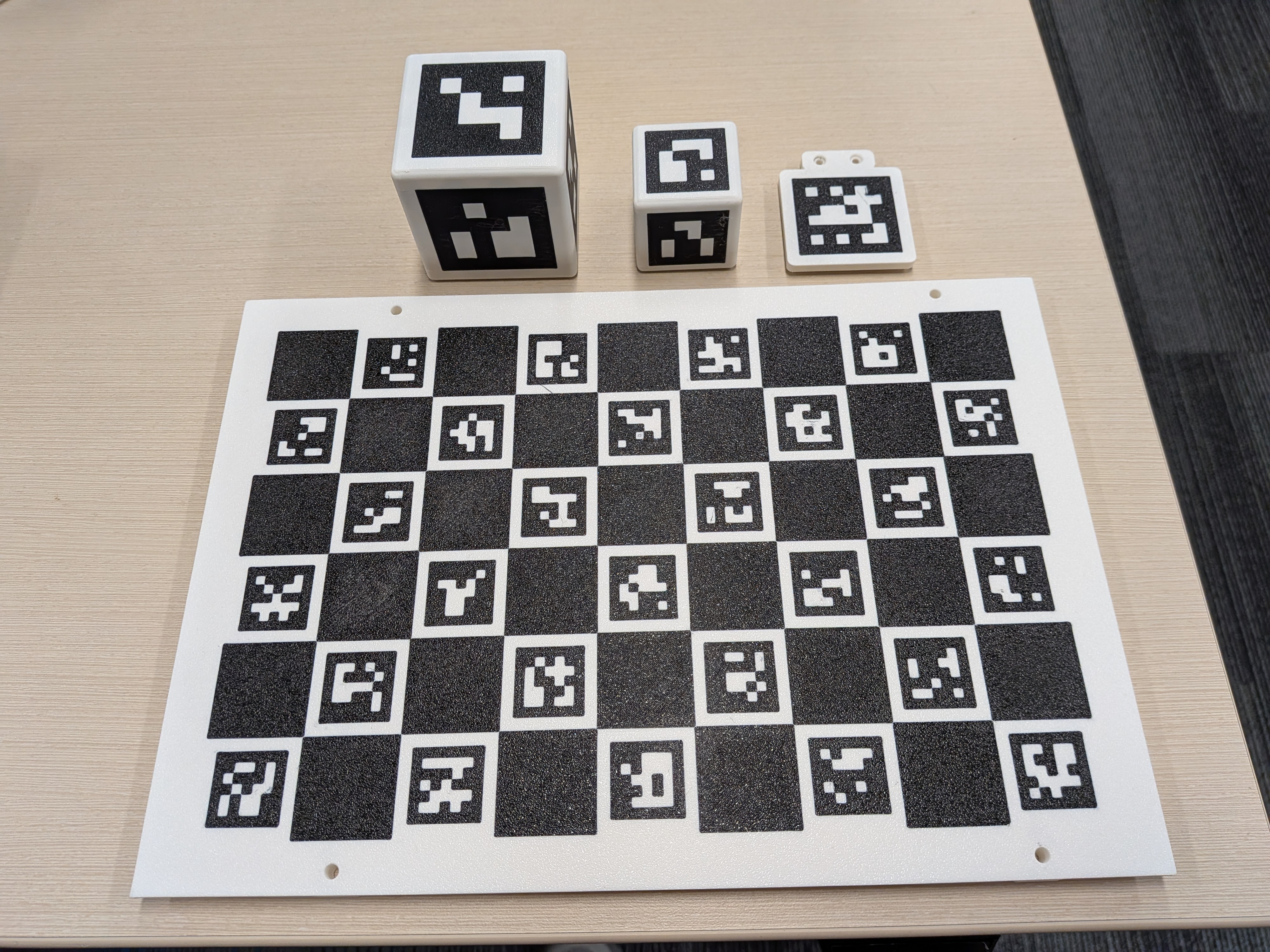
The physical target collection, photographed September 21: large and small marker cubes, a wrist-marker carrier and a ChArUco board. Use the sections below to match each part to its files and purpose.#
AprilCubes#
Runtime object |
Edge / perimeter radius |
Marker edge and dictionary |
IDs |
|---|---|---|---|
Small cube |
40 mm / 3 mm |
30 mm, |
0–5 |
Primary large cube |
60 mm / 3 mm |
45 mm, |
10–15 |
Secondary large cube |
60 mm / 3 mm |
45 mm, |
20–25 |
Use the profile that matches the physical cube#
Runtime profile |
Detector IDs |
Matched configuration |
|---|---|---|
|
0–5 |
|
|
10–15 |
|
|
20–25 |
For the 40 mm cube, the pinned AprilCube fork includes the multicolor 3MF, detector configuration and print settings. Use 100% scale. The documented starting settings are a 0.4 mm nozzle, 0.20 mm layers, four walls and 15–20% gyroid infill. Keep supports and the seam away from the marker planes, and remove support material without sanding the black/white marker surface.
The runtime profiles bind dimensions, detector configuration and grasp shortlist with hashes. For two-cube stacking, use the two distinct 60 mm ID ranges so the observations identify separate objects. The secondary profile shares the 60 mm grasp pool but uses its own detector IDs. A visually similar cube with another size or dictionary does not match these profiles.
For a new size or marker layout, use the pinned fork’s
target generator and retain the resulting
3MF, config.json and mesh together. Review the generated dimensions and IDs
before printing, then create a matching runtime profile and qualify its grasp
pool. The runtime configuration is not a slicer project.
Why changing scale requires new grasps#
The final 40 mm design replaced a 50 mm, 8 mm-radius design. Separately, the grasp-generation study used 45 mm geometry before the physical runtime was corrected to 40 mm. These are different experiments. New 40 mm proposals were generated and qualified; scaling the 45 mm atlas would change contact geometry.
The fork reports 48/48 successful synthetic views and 14 focused tests. These check generated geometry and detection. Physical print defects still need inspection: a damaged white cell or softened marker edge changes the image the detector sees.
The fork rounds the complete solid union rather than each voxel separately; the earlier per-voxel construction left seams in T-shaped parts. Marker planes stay flat. The printable 3MF and visual mesh share the rounded geometry; the MuJoCo collision boxes retain a conservative sharp envelope, as described in the cube design. Check the collision representation used by the task separately from the appearance of its rendered mesh.
For a replacement target, preserve the mesh, marker corner coordinates, dictionary, IDs, scale and print revision together. Inspect the printed edges and cell contrast before using its detections in a fit.
Dex3 dorsal markers#
The wrist calibration targets attach to the rigid hand shells. They make the hand visible from the head camera without requiring a target held by the fingers.
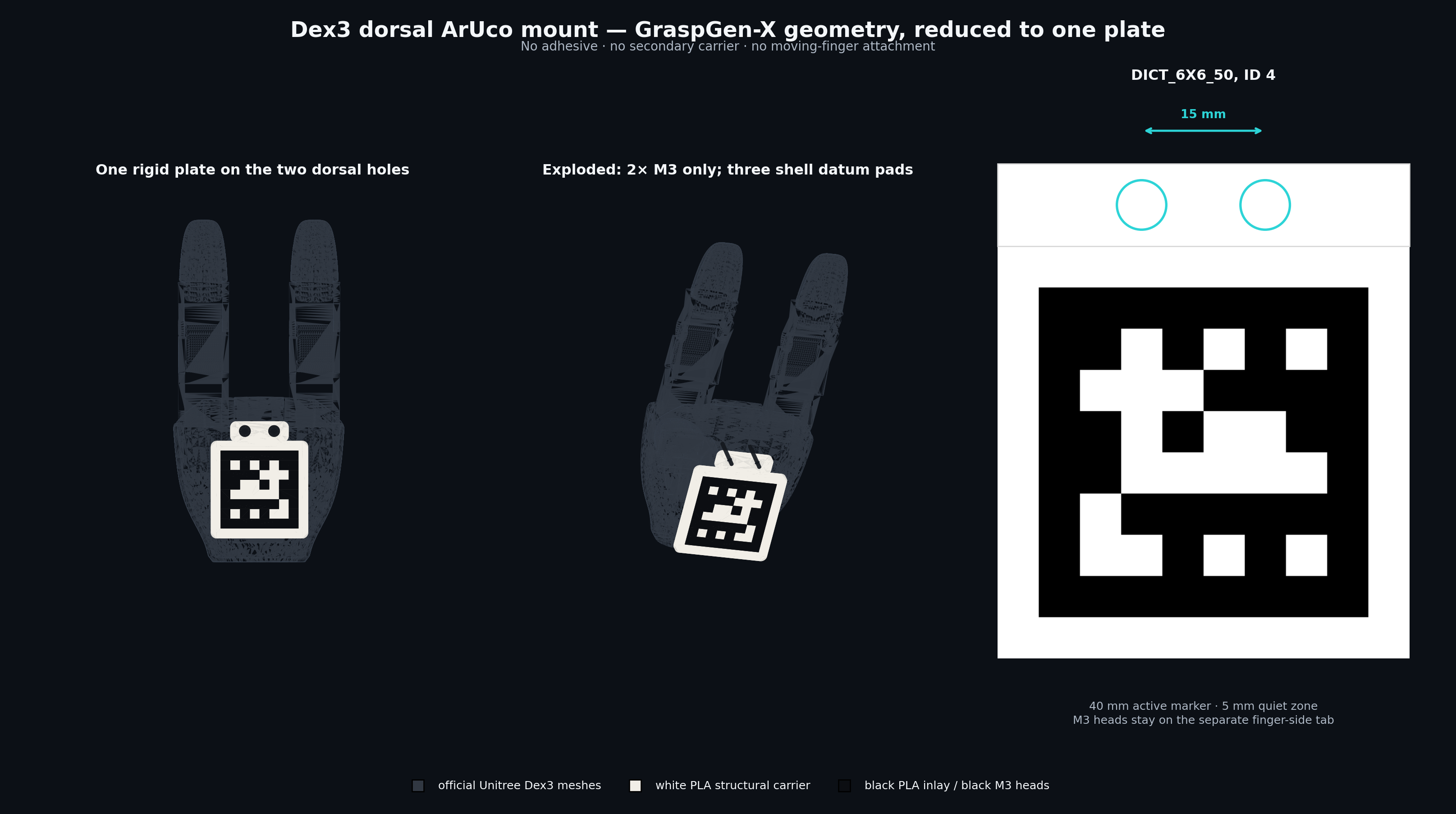
Wrist-marker placement. The screw tab is toward the finger bases; the marker extends toward the wrist. This is a CAD illustration of the right-hand mount. Use the separately identified left profile for the other hand. Open the full-resolution CAD view.#

Get the right print and detector pair#
Hand |
Print files |
Detector profile |
|---|---|---|
Right, ID 4 |
||
Left, ID 5 |
Both use white PLA for the carrier and matte black PLA for the marker. In the 3MF, keep the two parts at their shared origin and original scale. The supplied orientation places the marker face on the bed and the support pads upward; the source specifies 0.20 mm layers, four walls, at least five top/bottom layers and no supports. The 0.6 mm inlay occupies three nominal layers.
Print the small m3_15mm_fit_coupon.stl first. The two screws should enter the
shell holes without bending the coupon or forcing either screw sideways.
Read the mount assembly instructions
for the powered-off fitting sequence. The required hardware is two M3 × 8
ISO 10642 countersunk screws and a 2 mm hex key; washers are not part of that
countersunk stack. Verify all three pads contact the shell and the marker clears
the fingers. A square-on detector check should recover the intended ID and all
four corners at a marker size of 0.040 m.
Dimensions and the first-print correction#
The revision-2 carrier has a 50 × 50 mm optical plate and a 30 × 10 mm tab,
giving a 50 × 60 mm outline and 4 mm plate thickness. It carries a 40 mm
6x6_50 marker: right ID 4, left ID 5. The quiet border is 5 mm and the
inlay depth is 0.6 mm.
The two M3 holes are 15 mm apart and have a documented 3 mm blind depth. The specified M3×8 ISO 10642 stack leaves approximately 2.5 mm engagement and 0.5 mm reserve after a 5.5 mm stack. A longer M3×10 screw is not an equivalent substitution. Confirm the source drawing and the actual shell before reproducing the fit.
The first physical print exposed an important CAD assumption: its nominal 2 mm third support did not contact the shell. Accounting for the local tangent changed revision 2 to a 2.57 mm support with an approximately 1.994° pad-face angle. This is distinct from the drawing’s 1.143° mounting-surface pitch. A three-point support is only rigid when all three points actually seat.
Right dorsal is on negative palm Y; left dorsal is on positive palm Y. Copying the right-hand target transform to the left produced an invisible target in planning. Use the handed CAD transforms and a proper rotation.
Physical geometry and fitted geometry serve different purposes
A free calibration target transform can absorb FK error and place an effective marker inside the palm. Use the physical CAD target for visibility and occlusion tests. Use the selected fitted transform when evaluating its calibration model. Neither should silently replace the other.
Torso ChArUco carrier#
Prototype status: the upper R2 coupons were tried with M6 × 25 screws, but that length did not engage through the lower coupons. Resolve the lower fit and measured engagement before treating the complete frame as ready to assemble. It is not the calibration reference used by the stacking demo.
The current design is V7, kept in
robot-calibration-aprilcube-prototype.
It uses two broad torso crossbars and two flat side plates. These support the
accepted 210 × 300 mm multicolor carrier and its four M4 holes. The active
board is 6 × 9 squares, with 30 mm squares, 22 mm markers and 5x5_50,
covering 180 × 270 mm. V7 replaces the earlier frame whose small M6 boss
broke during support removal/handling in PLA.
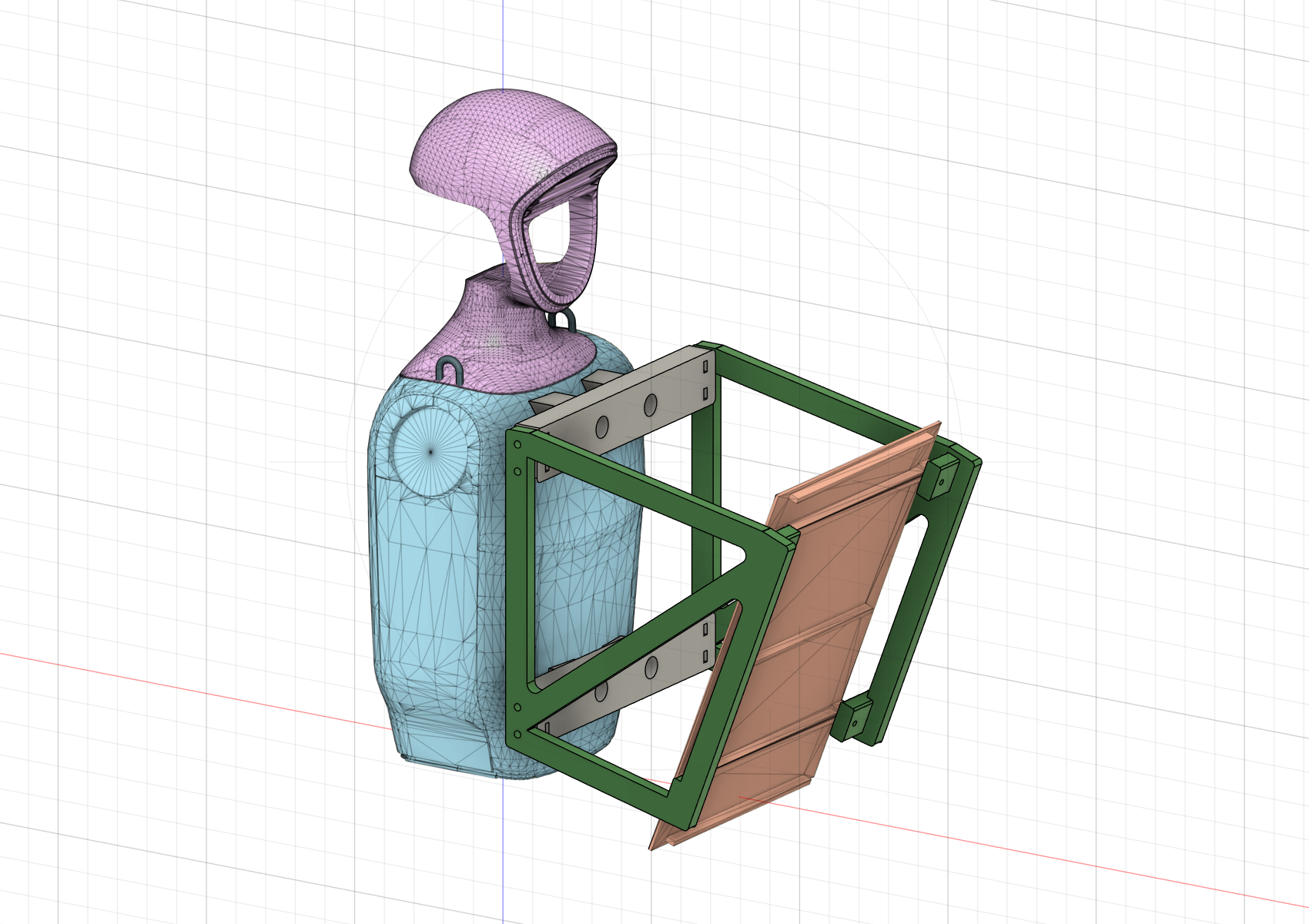
V7 CAD assembly. Two crossbars attach to the torso and two side plates carry the board. This shows the modeled arrangement; the full printed assembly has not been physically qualified.#
Need |
Exact source |
|---|---|
Slice the current structure after resolving coupon fit |
|
Open or print the current structure |
|
Inspect native CAD or exchange geometry |
|
Check the four shell interfaces |
|
Understand what physically fitted |
|
Edit or rerun CAD checks |
The R2 coupons preserve the full contact patches, M6 bores and washer bearing
planes while trimming the earlier coupons. Use the V7 print_parts/ and linked R2 coupon files. Pre-R2 meshes under original_reference/ are retained for
geometric comparison, rather than as another revision to print.
The September 13 physical record reports that M6 × 25 worked with the upper coupons but did not engage through the lower coupons. Upper washer use and engagement depth were not measured; lower screw length remains unresolved. The earlier M6 × 20 assumption and rough 35/40 mm estimates are not a confirmed hardware specification. All current seats retain a nominal 12 mm stack at the screw axis. Full crossbar seating, assembly stiffness, board flatness and reinstall repeatability remain unverified.
For a fixed board, the geometric relationship is
torso_T_camera = torso_T_board @ inverse(camera_T_board). V7 retains the
nominal board center [245, 0, 127.5] mm in torso_link, with +21° pitch.
The installed torso_T_board needs an independent physical check; low image
reprojection error alone cannot establish it. Recorded CAD checks, including
unobstructed target rays, do not qualify this fixture as a torso extrinsic
standard. The V7 work has not supplied a replacement for the August wrist-based
calibration bundle used by the stacking demo.
Evidence: AprilCube July 13–15 log; prototype dorsal-marker and torso-carrier documents; tabletop object-profile corrections. See sources and the media requests.
Follow the code#
What to change |
Code entry point |
Responsibility |
|---|---|---|
Runtime cube profile |
Bind cube dimensions, marker profile and task geometry. |
|
Dorsal mount specification |
dex3_dorsal_mount.py · |
Record dimensions and handed mounting geometry. |
Physical marker transform |
dex3_dorsal_mount.py · |
Compute the handed CAD marker pose. |
Mount artifact |
dex3_dorsal_mount.py · |
Export geometry and metadata for the mount. |
Current torso structure |
build_g1_mount_v7_fusion.py · |
Construct the V7 crossbars and side plates inside Fusion. |
Torso geometry checks |
Export print orientations and check mesh, tool and optical clearance. |
Checks and evidence to inspect#
The fork’s synthetic views establish geometry/detection checks, while the first dorsal print supplies the physical third-support correction. The photograph above shows the separate parts; final mount seating, third-pad contact and print quality remain in the review queue. Hand installation and its cable routing are covered under hardware.