Camera and network#
The camera must be a dependable measurement source before it can support calibration or planning. USB acquisition, service ownership, DDS discovery, image freshness, and geometric calibration are separate checks. A working preview proves only one part of that path.
What fails |
Check first |
|---|---|
Camera cannot start or required streams are absent |
Device ownership, then the USB/profile check |
Camera works but robot streams are empty |
DDS-to-ROS names and message workspace in recorded topology |
Image arrives but measurements do not match the model |
Rectification/CameraInfo and head position |
Image and joint measurements appear out of phase |
Recorded topology#
The onboard audit found Ubuntu 20.04 ARM64/Tegra with ROS Foxy and CycloneDDS;
the later research laptop used Ubuntu 22.04/Humble. PC2’s recorded Ethernet
address was 192.168.123.164 on eth0. The laptop interface varied with
the adapter; enp134s0 is a lab example, not a required interface name.
The audit also found an incorrect robot clock in 1970. An archive filename from that audit is not wall-clock evidence. Later analysis keeps sensor header time and bag receipt time separately; merely enabling NTP does not prove synchronization.
Unitree DDS channels such as rt/lowstate appear on the ROS graph as
/lowstate. Recording /rt/lowstate produced an RGB-only bag with empty
robot topics. Topic discovery also does not imply that the current Python
environment can deserialize unitree_hg; source the matching message workspace.
One camera owner#
The factory video_hub_pc4 process can own the RGB device while no standard
ROS camera topics exist. TeleImager and the ROS RealSense driver are alternative
consumers of the same hardware.
The focused repository’s tools/g1_realsense_pc2.sh carries the commissioned
camera lifecycle: lock the ownership change, release the factory video service,
start and verify the intended driver, and restore the service on stop or a
failed start. Camera-dependent hardware launchers use it. A tracked driver
process that is alive but produces no frames is not a healthy camera; a clean
stop/start recovered one such case.
Use the repository’s ownership helper rather than starting several camera applications. Its actions change PC2 services even though they do not command robot joints.
Inspect, acquire and release the camera#
From the tabletop checkout on the laptop, with the commissioned SSH key available:
./tools/g1_realsense_pc2.sh status
status reports the factory service, tracked ROS process and recent profile log
lines. It does not establish that new frames are arriving. The helper accepts
G1_PC2_HOST and G1_PC2_SSH_IDENTITY; its defaults are
unitree@192.168.123.164 and $HOME/.ssh/g1_pc2_ed25519.
Action |
Effect |
Evidence to inspect |
|---|---|---|
|
Locks the ownership change, stops |
|
|
Inspects service and tracked process without starting a driver |
A live PID is necessary but insufficient; check advancing image timestamps separately |
|
Stops the tracked driver and restores the factory service |
Reported service state, rather than the service command’s exit code alone |
The helper refuses an unrelated tracked PID or an untracked competing ROS driver. A failed fresh start attempts to stop its driver and restore the factory service. Preserve the log before retrying a failure.
Camera-dependent task wrappers perform a stop/start before entering the task.
They have no exit trap that restores the factory camera automatically. After
the task has resolved robot ownership and no other researcher needs the ROS
camera, use stop to return camera ownership explicitly.
The commissioned helper fixes the PC2 ROS paths, serial, profiles and DDS domain 0 in its source. Changing a task’s domain argument does not change these camera settings. Check them when adapting the setup.
Profiles used at different stages#
Stage |
Profile and evidence |
|---|---|
June direct USB/TeleImager |
640 × 480 color at 30 FPS; laptop ZMQ client received about 30 FPS |
Focused calibration/manipulation |
RGB8 1280 × 720 at 15 FPS, matching frozen CameraInfo |
Native depth recording |
Unaligned Z16 640 × 480 at 15 FPS |
Motion streams |
Separate raw gyro and accelerometer; no synthesized orientation |
Offline alignment |
Depth/color intrinsics and factory static transforms retained |
Moving the cable to another PC2 port resolved a USB/UVC acquisition failure. If the camera negotiates USB 2, try another port and verify the driver-reported speed. The photograph identifies the connection area, not a universally correct socket. Check acquisition independently of browser preview playback.
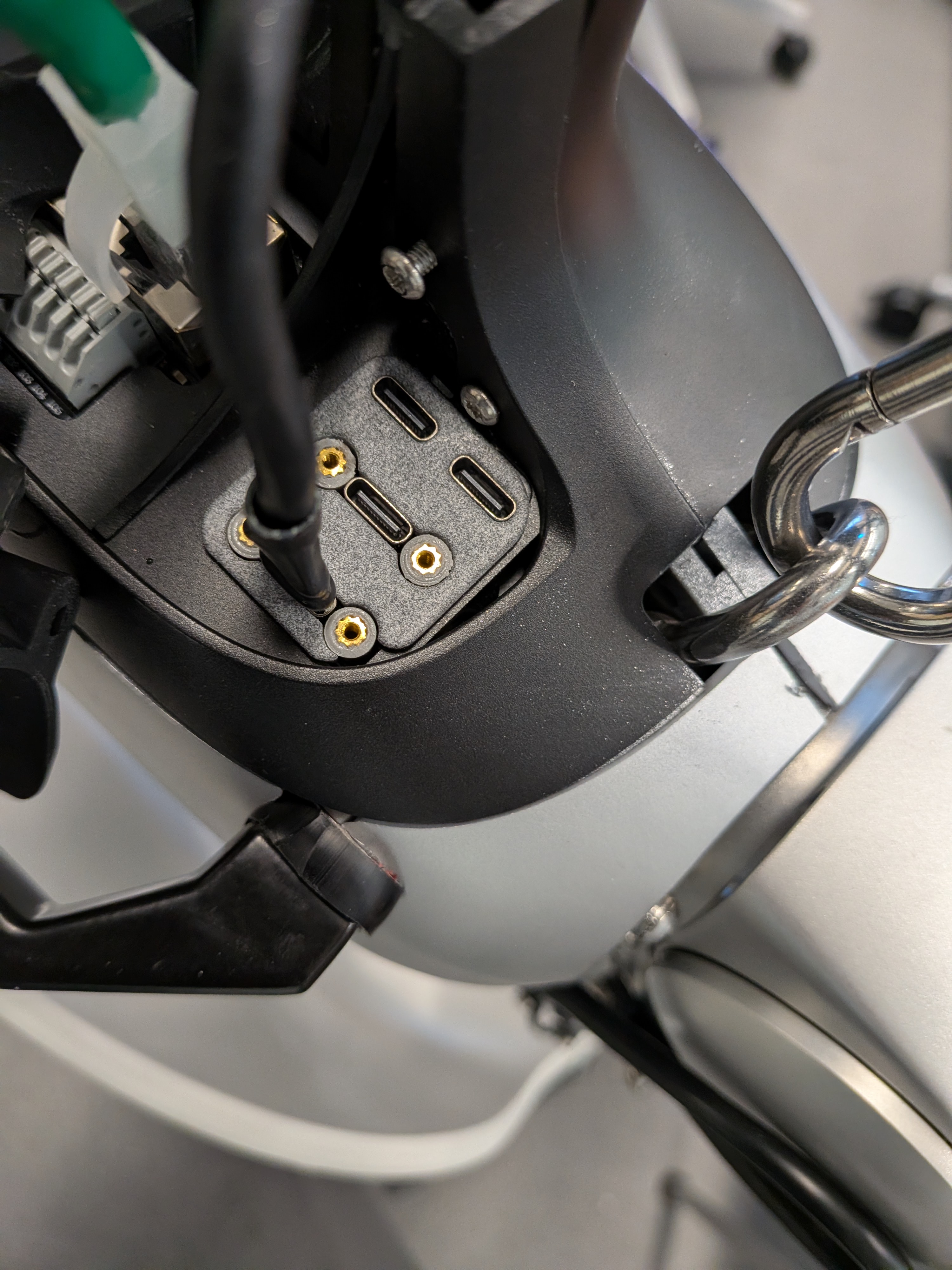
RealSense USB connection at PC2, photographed August 3. If the negotiated link is USB 2, try another port and verify the driver-reported speed. The photo illustrates the connection area; use the runtime check to establish USB 3.#
The camera lifecycle helper requires the fresh driver log to
contain Device USB type: 3.2, alongside the serial and stream-profile checks.
The standard hardware wrapper stops and starts
the camera before tabletop, stacking, bilateral-calibration and seat-compliance
commands, so a failed startup check prevents that wrapper from launching the
task. This checks the commissioned driver’s exact 3.2 log string, rather
than parsing all possible USB 3 versions. Directly reusing an already-running
node takes a different branch and does not repeat the USB check.
Calibration stream semantics#
The optimizer assumes rectified color coordinates and uses the projection
matrix P[:3, :3]. It does not silently combine raw distorted pixels with a
rectified model. Topic names alone are insufficient: inspect the actual
CameraInfo, profile, dimensions, distortion contract, and frozen hashes.
The D435i’s factory depth-to-color transform is internal sensor calibration. The robot-to-color transform is a different quantity. The manually adjustable head makes a nominal URDF camera transform an initialization, not a measured extrinsic. Mark and preserve the head angle within a dataset; after adjustment, obtain a new camera registration.
Head-pitch witness mark#
The white witness mark is the lab’s physical reference for the calibrated head pitch, identified by the author in the photograph below. Include this view when recording a setup so another researcher can recognize the intended position.
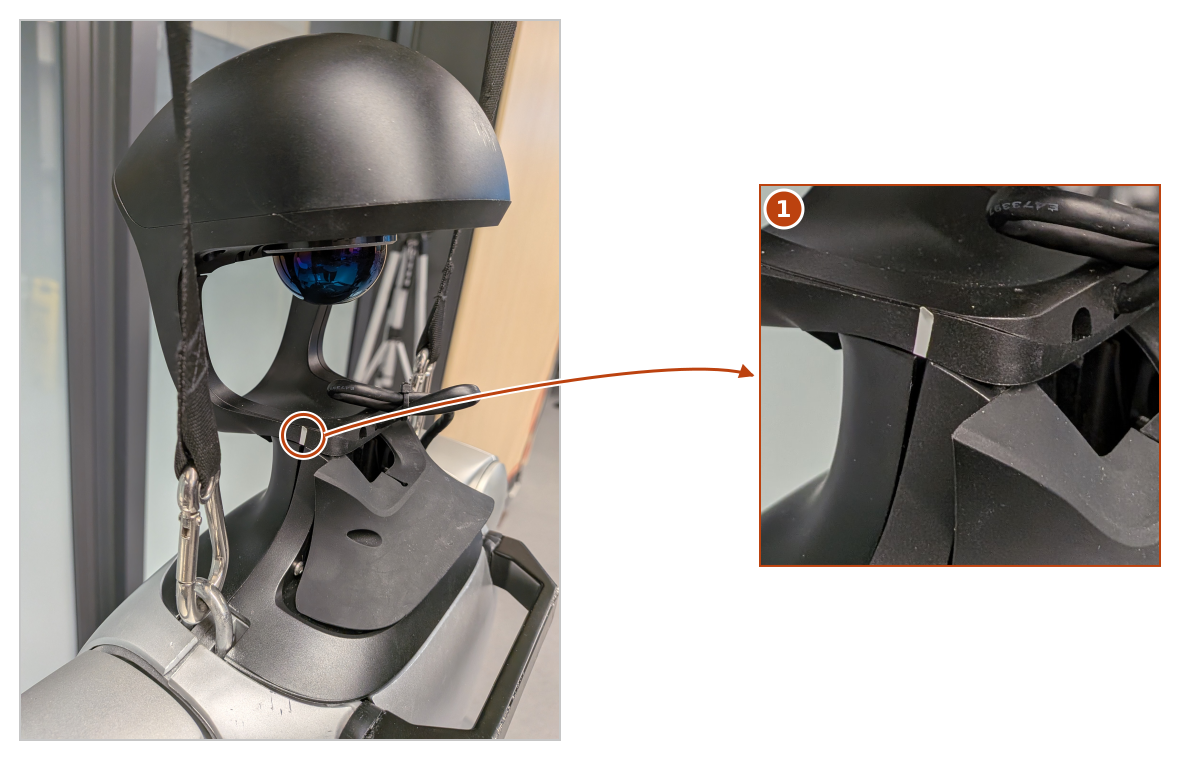
Reference for calibrated head pitch. Detail 1 shows the white witness mark on the head support. Reference photograph supplied September 21.#
Match the physical head position to the setup recorded for the selected bundle. The mark helps reproduce that position, but it does not measure how accurately the camera returned to it. If the head has been adjusted, obtain a new camera registration before relying on the old robot-to-camera transform.
Freshness and pairing#
Keep the sensor header timestamp, local monotonic receipt time, complete measured-state window, and selected frame. Calibration captures are stationary, with state samples bracketing each image. One early buffered-image incident showed why receipt proximity alone cannot prove exposure freshness.
For moving or continuous analysis, map producer clocks explicitly. The seat study found substantial offsets and different RGB/depth phases. Treating all header stamps as one synchronized clock can manufacture motion.
Evidence: G1Pilot June camera postmortem/onboard audit; tabletop August 13–16 camera and recording entries; recording contract.