The lab robot#
The summer work used a G1 with two Dex3 hands, a head-mounted RealSense D435i connected to the robot’s onboard PC2, and an Ethernet-connected research laptop. Manipulation was developed with physical support and a load-bearing harness. The exact configuration changed during the work; a machine-mode number is not a substitute for inspecting the robot.
Configuration that matters#
Item |
Recorded fact |
Consequence |
|---|---|---|
Body state |
|
Decode the matching HG messages; do not confuse it with an FSM |
Hands |
Seven joints per Dex3, independently commanded |
Body and hand arrays have different mappings |
Head pitch |
Manually adjustable, non-motorized and unsensed |
Changing it invalidates the complete camera extrinsic |
Early waist setup |
June operator confirmed mechanically locked roll/pitch |
Initial MuJoCo model fixes those two joints |
Later standing work |
September bags show measured waist roll/pitch movement |
June’s mechanical condition cannot be assumed for later runs |
Seated work |
Arms initially supported on table, body on chair |
Takeover and lifting change the camera/table relationship |
Camera |
D435i on PC2 USB |
Camera ownership and physical USB routing matter |
IMUs |
Pelvis in LowState; separate torso IMU |
They measure different rigid bodies |
Do not reconcile these dates by silently selecting one “G1 configuration.” A new run should record the physical waist hardware, hands, camera angle, support, and selected model. The photographs below show particular setups; record the current arrangement again when those conditions change.
Dex3 installation and cable routing#
The hand signal connection and wrist power connection follow separate paths.
The lab used extensions to make the signal connection accessible during swaps.
The extensions were
Blue Robotics JST-GH, 4-pin, 300 mm; the product screenshot shows
BR-103531-300. They bring the two internal hand connections outside the torso,
so later hand swaps do not require exposing the motherboard. The deck identifies
these as USB 2.0 hand connections, separate from the RealSense USB 3 connection.
The vendor’s extension-cable page
describes the cable family; it does not supply the G1-specific pinout. The
installation photographs and observations come from the lab’s Dex3 Hands.pptx.
Before using the fitting photographs#
This section preserves the lab’s mechanical sequence and cable routing. The G1-specific electrical pinout, power-isolation procedure and present condition of the wrist fasteners still need confirmation; the photographs alone are not a complete electrical installation procedure. The review queue tracks those specific gaps.
Fitting the hand#
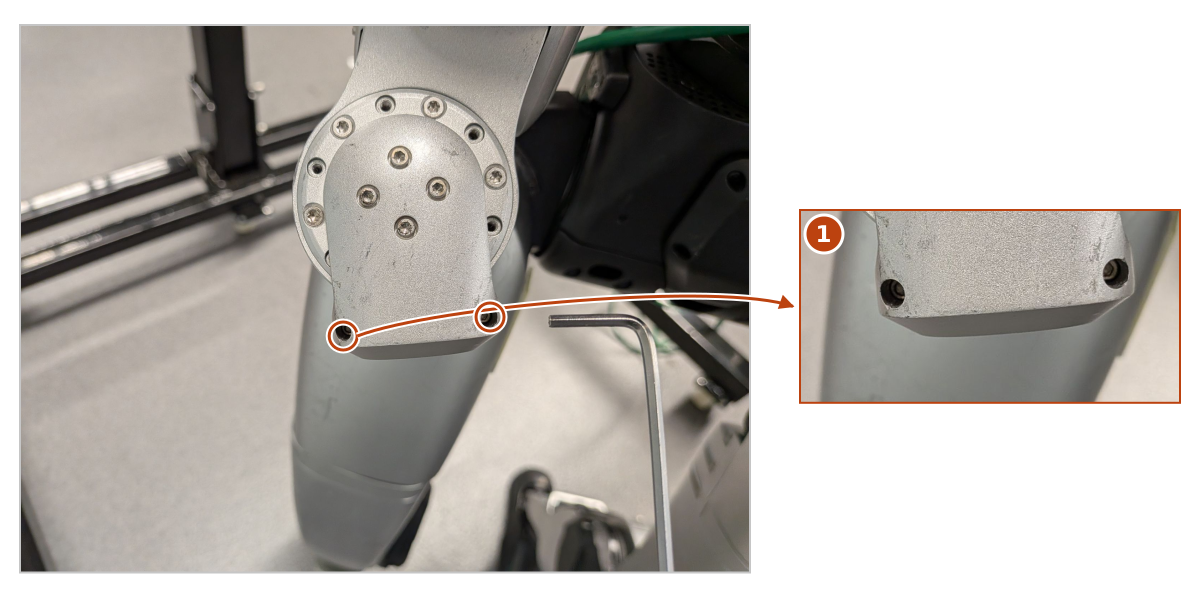
Wrist attachment screws. The two rings identify the screws marked in the author’s installation slide; detail 1 enlarges that part of the wrist. These are distinct from the cover-plate screws discussed below.#
The recorded fitting sequence passes the two wrist connectors through the gap, then seats and fastens the hand before mating those connectors and closing the cover. Excessive insertion force was the operator’s cue to stop and check the fit. Use the photographs to identify that connector path alongside the installation prerequisites above.
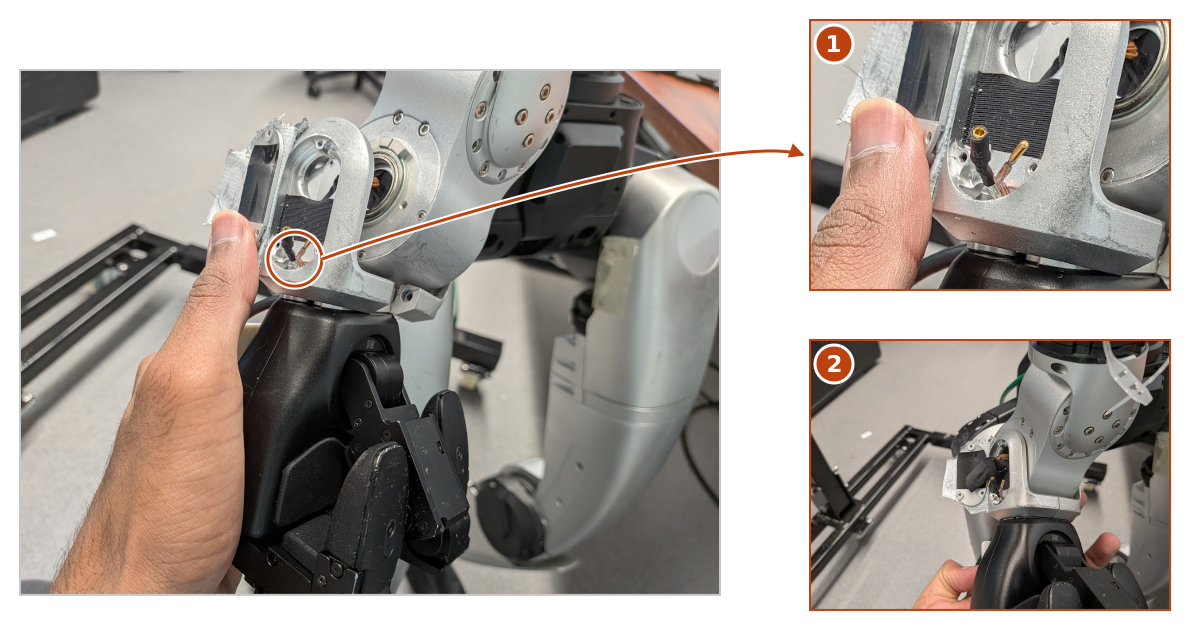
Route first, then seat the hand. Detail 1 shows the two connectors passing through the gap indicated in the original slide. Detail 2 shows the seated hand with the connectors accessible through the cover opening. The installation notes place mating the connectors after seating and fastening the hand. Stop and check alignment if insertion requires excessive force.#
Cable routing and repeated swaps#
The routing uses protective cable sleeves and reusable zip ties. A sticker on the cable marks the slack to reproduce at the next installation. This makes the routing repeatable when swapping between dummy hands and Dex3.
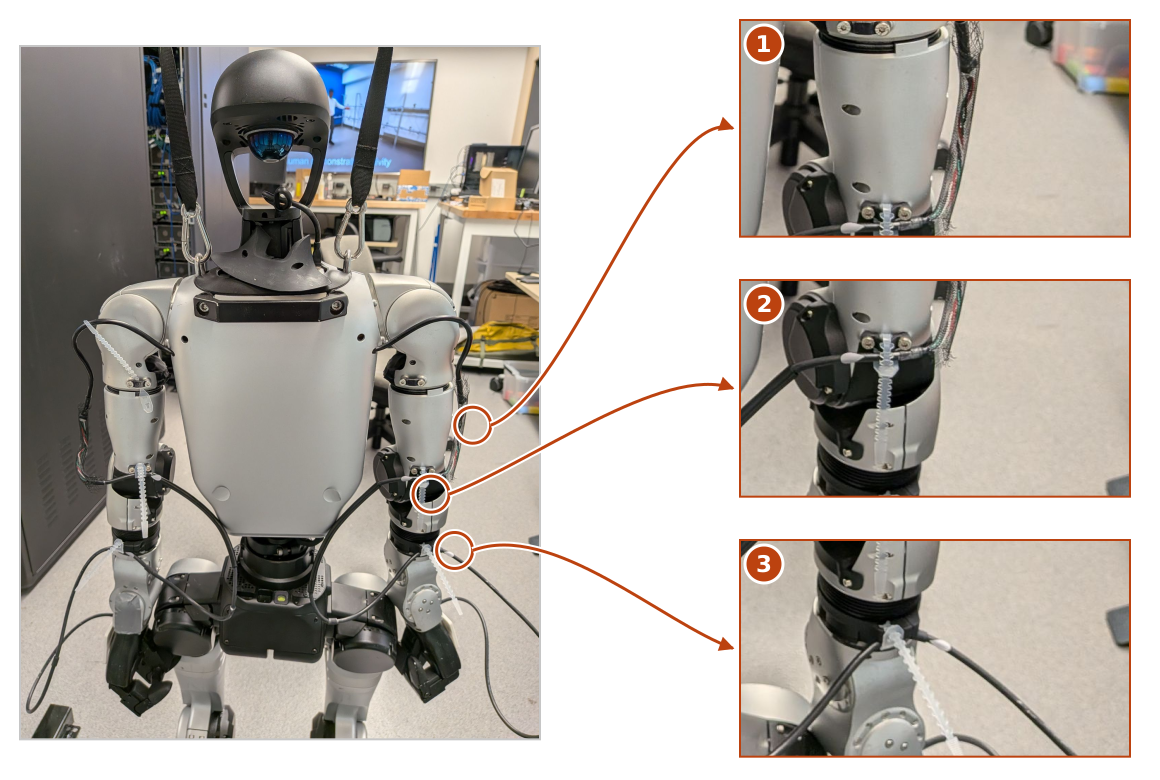
Cable routing for repeated hand swaps. 1 — Sleeve: protects the exposed wires. 2 — Reusable zip ties: secure the routing. 3 — Slack marker: the sticker records how much cable to leave when reinstalling. The callouts follow the author’s marks in the installation slide; the inset photographs enlarge the same source image.#
The hand’s 214-R/L-T identity determines its left/right topic; swapping
physical ports does not redefine which hand it is. After assembly, the
passive pressure tools provide a way to inspect hand
state and the spatial tactile display.
The deck also records damaged cover-screw threads on both wrists and a tape workaround on this particular robot. That is a historical maintenance condition, not a general substitute for the intended fasteners. Its linked Unitree manual describes an older G1 layout, which the author explicitly distinguishes from the lab robot’s photographs.
The deck’s linked boot-calibration video remains unavailable in the supplied collection. Media provenance records the original deck and the figures used here.
The dorsal marker mount is a separate installation: it attaches a printed target to the rigid hand shell. Its M3 screws do not describe how the hand attaches to the robot wrist.
Joint names are the interface#
The body layout places left arm joints at indices 15–21 and right arm joints at 22–28. Waist yaw/roll/pitch occupy 12–14; arm-SDK blend weight occupies slot 29 in the 35-slot HG command message. The full message therefore has more slots than physical body joints.
The pressure study physically observed right-hand motor order as thumb 0/1/2, middle 0/1, index 0/1. A URDF tree, CuRobo model, or simulation bridge may list index before middle. Always map by the named model/message convention; slicing seven unnamed values caused real integration failures.
Likewise, the two palm frames are not interchangeable. The canonical grasp adapter uses a proper rotation and signed finger mapping. Dorsal marker placement is on opposite palm-Y sides. Reflecting an image or copying the right-hand transform does not produce a valid left-hand coordinate frame.
Physical support is part of the experiment#
A rigid seat reduced observed camera movement during arm lifts, but the cushion/rigid runs were not posture-matched. The result supports the practical choice of rigid support; it does not isolate a cushion stiffness parameter.
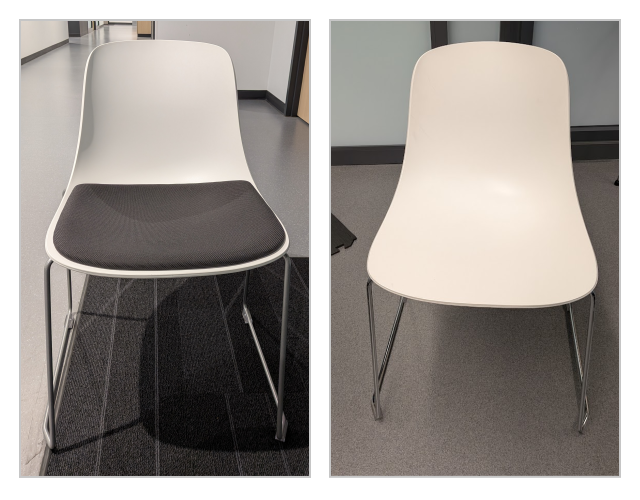
The same chair with the seat cushion (left) and with it removed (right).#
The body-motion chapter explains why lifting the arms can change the camera/table relationship and why observations must be refreshed at motion boundaries.
Record the chair, feet, harness, arm support and camera witness mark with a run. None of these is captured completely by a URDF. A model that agrees with the vendor model can still disagree with manufactured geometry: the later wrist-spacing investigation is the clearest example.
Evidence: G1Pilot June log and onboard profile; tabletop August 16 and September
standing logs; author-provided Dex3 Hands.pptx, slides 1–8.
Source identities.